
Building a PostgreSQL Browser for Obsidian with Electron
I was in the middle of work, had Obsidian open already, and just needed to inspect a local PostgreSQL database. Normally that means switching apps, opening pgAdmin, logging in again, and clicking thro
I was in the middle of work, had Obsidian open already, and just needed to inspect a local PostgreSQL database. Normally that means switching apps, opening pgAdmin, logging in again, and clicking through a UI that feels older than it needs to. At some point I just stopped and thought: why am I leaving the app I am already working in just to inspect a few tables?
Obsidian has such a rich plugin ecosystem that a PostgreSQL browser felt obvious. But after searching around, I could not find one that did what I wanted. That was the moment the idea stopped feeling random and started feeling interesting.
Why this even works
A lot of people still think of Obsidian as "just a note-taking app." On desktop, though, it runs on Electron. That changes the entire equation.
Inside that plugin environment, you are not limited to browser-only capabilities. You can write TypeScript, bundle it with esbuild, use the Obsidian plugin API for UI and lifecycle, and rely on Node.js APIs under the hood. In this case, that means a plugin can talk directly to PostgreSQL over TCP/TLS without needing a separate backend service.
That was the coolest moment for me while building this. The moment I realized Electron makes this kind of extension possible, the whole project suddenly made sense.

That architecture is the real story here. The PostgreSQL Browser matters because it shows how far you can push Obsidian once you stop thinking of it as a passive note app and start thinking of it as an extensible Electron shell.
How the plugin is built
The plugin itself is fairly small and straightforward:
Obsidian plugin API for lifecycle, commands, ribbon icons, settings, and custom views
TypeScript for the plugin code
esbuild to bundle everything into one
main.jspostgresas the PostgreSQL clientNode
netandtlsunderneath, provided by Obsidian's Electron runtime
The plugin starts by registering its custom view and a couple of entry points:
this.registerView(
  VIEW_TYPE_PG_BROWSER,
  (leaf) => new PostgresBrowserView(leaf, this),
);


this.addRibbonIcon("database", "Open database browser", () => {
void this.activateView();
});


this.addCommand({
id: "open-view",
name: "Open",
callback: () => void this.activateView(),
});
Direct PostgreSQL connections from inside Obsidian
I chose the postgres package because it is pure JavaScript and does not drag native dependency pain into an Electron plugin. That makes development much easier than trying to wire up a client that expects extra binaries or rebuild steps.
The connection manager is where the Electron angle becomes real:
const isLocalhost = isLoopbackHost(cleanedStr);


const sql = postgres(cleanedStr, {
max: 3,
idle_timeout: 300,
connect_timeout: 10,
ssl: config.ssl ?? (isLocalhost ? false : "require"),
prepare: true,
});


if (effectiveSchema) {
await sql.unsafe(
SET search_path TO ${quoteIdent(effectiveSchema)}, public,
);
}
The important details are simple: localhost defaults to no SSL, remote connections default to require, non-standard params like Prisma's ?schema=... get stripped first, and the plugin sets search_path up front when a schema is provided.
Query execution and safety boundaries
The SQL tab is intentionally simple. It runs arbitrary SQL and shows the result set in the plugin view. That also means I had to be clear with myself about what this tool is and what it is not.
The core execution flow looks like this:
const timeoutMs = Math.max(1, Math.round(timeoutSeconds)) * 1000;
await sql.unsafe(`SET statement_timeout = $1`, [timeoutMs]);
try {
const result = await sql.unsafe(queryText);
return mapResult(result);
} finally {
await sql.unsafe("SET statement_timeout = $1", [0]).catch(() => {});
}
The important detail is sql.unsafe(queryText). That is exactly what you want for a developer-facing SQL runner, because the whole point is to let the user execute raw SQL. It is also exactly why I would frame this plugin as a local/dev workflow tool, not something I would market as "safe for production databases."
I also wired query timeout handling through SET statement_timeout, so long-running queries are not left hanging forever.
Schema browsing and table editing
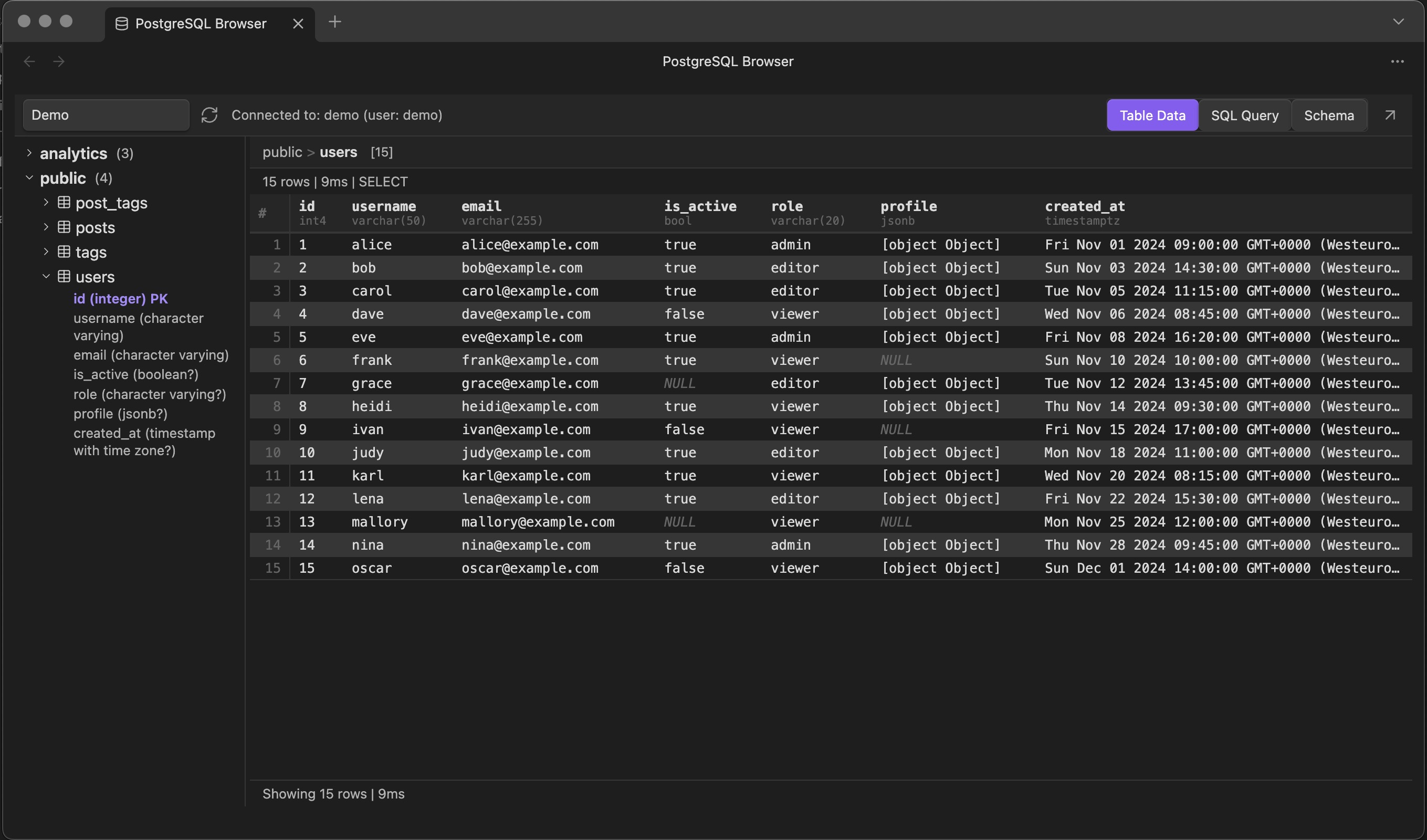
The sidebar tree is powered by a mix of information_schema and PostgreSQL catalog queries. Schemas load first, tables load under them, and then table details pull in columns, constraints, indexes, foreign keys, and an estimated row count.
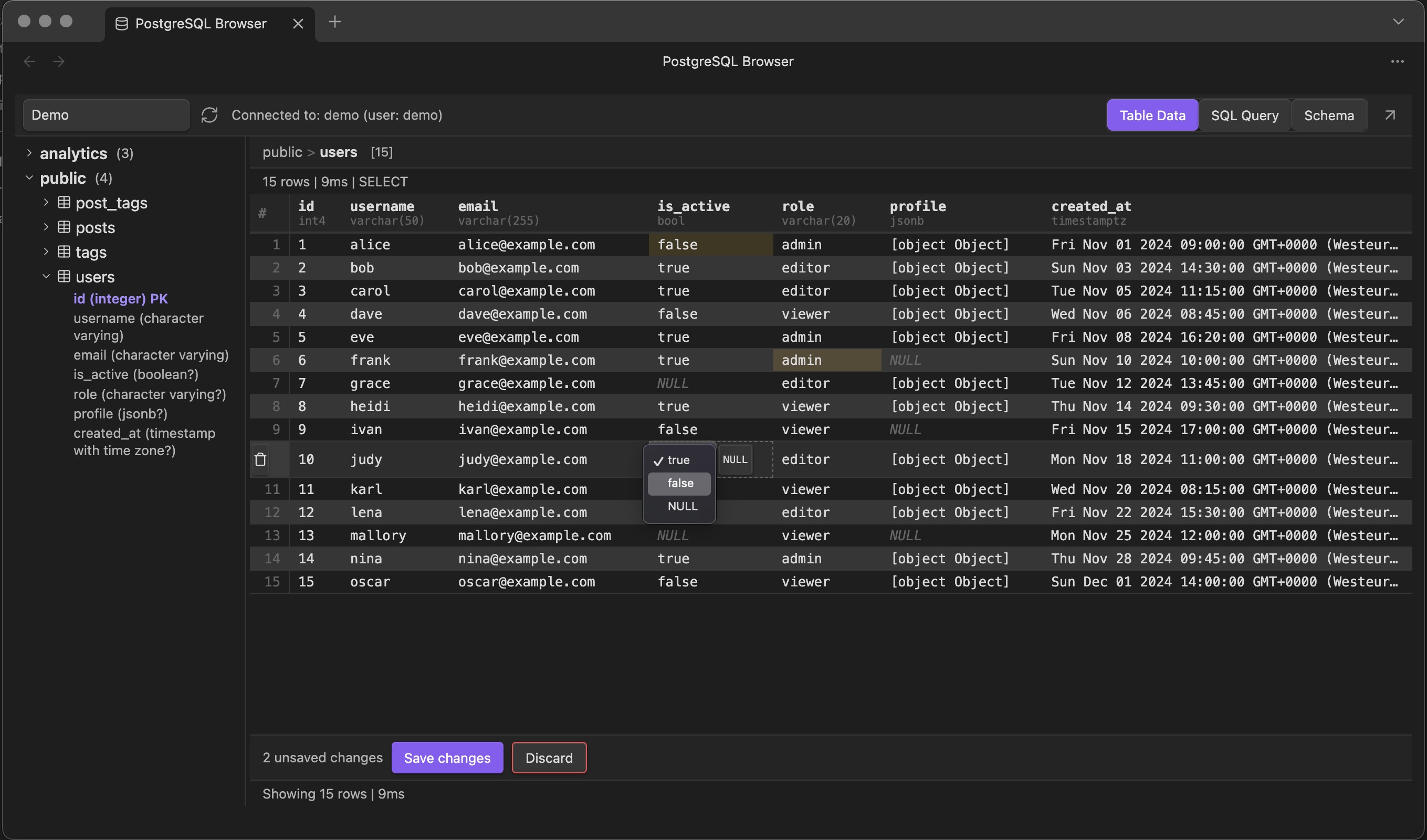
On the data side, table previews are intentionally practical: click a table, fetch a limited number of rows, and render them immediately. If a table has a primary key, the plugin can map a cell change back into an UPDATE statement and also stage row deletions.
That editing flow is backed by a pending-changes model in the results table UI.
this.pendingChanges.set(key, {
  td,
  column: result.column,
  rowIndex: result.rowIndex,
  oldValue,
  newValue: result.newValue,
  row,
});
That part was fun because it makes the plugin feel less like a read-only inspector and more like a real developer tool.
Why it is desktop-only
This plugin only makes sense on Obsidian desktop. Obsidian mobile runs inside a webview-style environment without the same Node runtime capabilities you get on desktop Electron, which means no direct access to the plumbing that packages like postgres rely on for TCP/TLS connections. That is why the manifest explicitly marks the plugin as desktop-only.
What the plugin does in practice
From a user perspective, the plugin exposes three main modes:
Table Data for previewing rows and editing cells inline
SQL Query for running ad hoc SQL and inspecting results
Schema for drilling into columns, constraints, indexes, and relationships
The main workflow is simple: choose a connection, let the schema tree load, click a table, and inspect or query without leaving Obsidian. That was the whole point from day one.
It also supports:
multiple saved connections
per-table previews with a row limit
PK/FK metadata in the tree and detail view
inline editing for booleans, enums, JSON, dates, and numeric values
row deletion for tables with primary keys
a query result table with row counts and execution duration
Again, I would use that editing capability for local or development databases, not as a blanket recommendation for production environments. The feature is there because it is useful while building, debugging, and checking data quickly.
Tradeoffs and caveats
I wanted this article to be technical, so it would be dishonest not to mention the rough edges.
First, direct write capabilities are powerful, but they come with real risk. The query tab can run arbitrary SQL. The data view can stage updates and deletes. Useful, yes, but it should be treated with the same care as any database client.
Second, secret handling depends on the Obsidian version. On newer Obsidian versions, the plugin can use app.secretStorage and push connection strings into the OS keychain. On older versions, it falls back to plaintext plugin data. That is a meaningful tradeoff, not a footnote.
this.available =
  app.secretStorage != null &&
  typeof app.secretStorage.setSecret === "function";
if (this.available) {
this.app.secretStorage.setSecret(this.key(connectionId), connectionString);
}
Third, the plugin is intentionally small. There is no fancy query planner UI, no result pagination yet, no read-only mode in the query runner, and no deep production-hardening story. I am okay with that. I would rather have a focused tool than a bloated clone of pgAdmin living in a sidebar.
What I learned building it
The biggest lesson was that Obsidian plugin development is more approachable than it looks once you understand the runtime model. Before this project, "build a database tool inside Obsidian" sounded slightly absurd. After spending time with the plugin API and Electron constraints, it felt pretty natural.
The second lesson was more practical: if you want to polish a plugin for the broader Obsidian ecosystem, follow the linting rules early. I only really felt that pain when getting the repo ready to submit and cleaning up issues that I could have caught much earlier by leaning on the Obsidian ESLint rules from the start.
That was a useful reminder that release friction is often just deferred discipline.
If you want to try it
The repo is here: Mill1995/obsidian-postgres-browser
If you want to test it, I would do it exactly the way I built it: point it at a local or development PostgreSQL database, click around, run a few queries, and see whether the workflow feels better than context-switching to a separate database app.
I also ended up polishing the repo and release flow with the Obsidian Community Plugins process in mind, because this feels like the kind of small tool I'd like to see in that ecosystem.
If you try it and have feedback, that is the part I care about most. I wanted to see whether Obsidian could be extended into a more serious developer workspace, and this plugin was a concrete way to test that idea.
Turns out: it can.